
SoundFoodSoundFoodSoundFood
  • News
  • A/V Media
  • A/V Interiors
  • How Stuff Works
  • iPod & Portable Players
    • Headphones
    • iPod
    • Mp3 & Mp4 Players
  • Equipmet Reviews
    • AC Power
    • Accessories
    • Blu-ray & HD DVD Players
    • HDTVs (Plasma, LCD, Rear Projection…)
    • Home Theater in a Box
    • Music Servers / MP3 Players
    • Power Amps (Multi-Channel, Stereo, Integrated)
    • Preamps (AV, Stereo…)
    • Receivers
    • Remotes and System Control
    • Speakers
    • Subwoofers
    • Video (Projectors, Processors…)
Reading: Neuros OSD recording and streaming system review
Share
SoundFoodSoundFood
  • News
  • A/V Media
  • A/V Interiors
  • How Stuff Works
  • iPod & Portable Players
    • Headphones
    • iPod
    • Mp3 & Mp4 Players
  • Equipmet Reviews
    • AC Power
    • Accessories
    • Blu-ray & HD DVD Players
    • HDTVs (Plasma, LCD, Rear Projection…)
    • Home Theater in a Box
    • Music Servers / MP3 Players
    • Power Amps (Multi-Channel, Stereo, Integrated)
    • Preamps (AV, Stereo…)
    • Receivers
    • Remotes and System Control
    • Speakers
    • Subwoofers
    • Video (Projectors, Processors…)
Follow US
  • About
  • Privacy Policy
  • Sitemap
  • Contact Us
Copyright © 2007 - 2024 SoundFood. A Symphony of Audio-Visual Tech Updates!
SoundFood > Equipmet Reviews > Accessories > Neuros OSD recording and streaming system review
Accessories

Neuros OSD recording and streaming system review

Allan Ford May 1, 2008

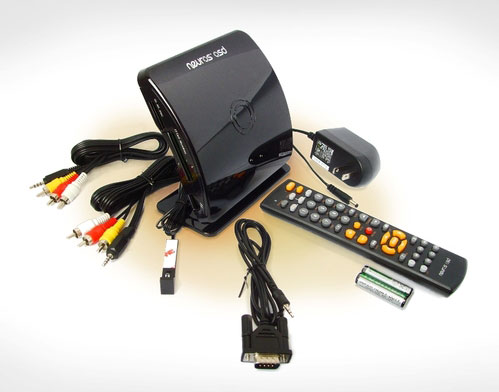
Neuros OSD recording and streaming system

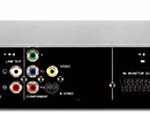
The basic premise of the Neuros OSD is that you connect almost any video source through the OSD to your TV to view the media whilst recording onto a range of different formats. The OSD device develops on the MPEG-4 Recorder we reviewed back in 2005.

The OSD contains a number of ports for most common memory cards, as well as USB, either for direct connection to a portable device, such as an iPod, or to a USB drive.

Using the supplied composite cable and Scart adapter you can connect to most video sources; we used a DVD player and VHS player. The OSD allows the devices to play-through, i.e., you watch them through the OSD “channel” that your TV is tuned into, most likely one of the AV channels.

Operation is controlled through the supplied remote control in combination with the on-screen menu system. The on-screen menu is basic and fairly clunky but is navigatable after a fashion; certainly it takes the shine off the package. The remote unfortunately has a limited viewing angle, so it is a struggle to get the OSD to respond at times, which can be frustrating.
123Next Page

You Might Also Like

Philips SHE9850 Headphones Review

Nordost Heimdall Speaker Cable

Tvonics DVR-250 – Freeview Playback Box review

XtremeMAC HDMI and AV Connection Solutions review

Apple TV

TAGGED:Neurosrecording
Share This Article
Facebook Twitter Copy Link Print
Previous Article Samsung T10 ‘La Fleur Special Edition’
Next Article Scarlet introduced by LG for its LCD TV Series
Leave a comment

Leave a Reply Cancel reply

Your email address will not be published. Required fields are marked *

Latest News

NAD C162/C272
NAD C162/C272 System Combination
Equipmet Reviews March 28, 2024
Yamaha DVX-1000 2.1-Channel Home Cinema Review
Home Theater in a Box November 20, 2008
Aiptek Pocket Cinema Projector V10 Review
Video (Projectors, Processors...) October 22, 2008
Optoma Pico Pocket Projector
Optoma Pico Pocket Projector Video Reviews
Video (Projectors, Processors...) October 22, 2008
Copyright © 2007 - 2024 SoundFood. A Symphony of Audio-Visual Tech Updates!
  • About
  • Privacy Policy
  • Sitemap
  • Contact Us
Welcome Back!

Sign in to your account

Lost your password?