
Setup and Use
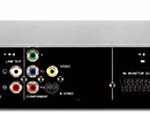
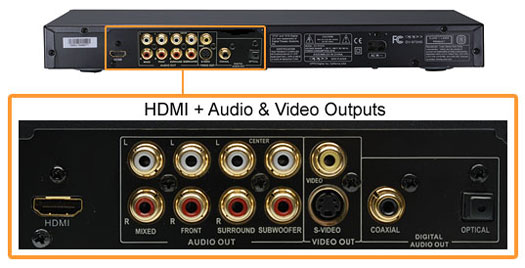
The connectors on the back include of the DV-981HD include HDMI, S-Video and composite out for vid-eo. Audio outputs include both optical and coaxial for Dolby Digital and DTS, along with stereo RCA outputs and more of these outputs for analog 5.1 multichannel sound (Front L/R speakers, Center, Surround L/R and subwoofer). But why Oppo chose to leave out a component video output is a head-scratcher, especially as there are still a huge number of displays out there that don’t have HDMI inputs, both large “home theater” types along with smaller sets used in dens, children’s room and the like. The only reason we can come up is perhaps the company figured that since it had HDMI why bother with component? But to be fair this player shouldn’t be confused with some $49 USD model bought at Costco for attaching to a 20″ TV in the basement.
We attached the DV-981HD using HDMI to a Samsung HLS5679W LED rear-projection display and scaled to the video up to 1080p with audio coming out of the optical and analog ports connected to a Denon 2807 receiver.
We started by pressing the Setup button on the Remote, which gives you a row of Selections at the top, with corresponding choices appearing below. We set the player for the infamous 16:9 aspect ratio as this looks best for the majority of DVDs since they’ll be in widescreen, keep in mind though that this automatically widens standard format (4:3) images as well and doesn’t make them look very good. So don’t get lazy and change the aspect ratio when playing a full screen disc. Other choices let you set the resolution, decide how SACD and DVD-A discs will perform, conform the player to the size of the speakers being used, etc. Of course that also includes brightness and contrast control, noise reduction and other video aspects – although we find it best to keep all these at neutral and adjust at the display instead.
But we have to say that the menu system’s GUI (Graphical User Interface) leaves a lot to be desired; it’s very old-school, non-intuitive, and at times just plain ugly. This is where the Oppo shows its shortcomings because while you can muddle your way through, it’s not a fun ride. But the good news is that doesn’t affect performance in any way – and once you’ve taken care of the settings you can forget about ever returning to them (unless you must).
Ease of use
There are a number of “power user” and convenience controls that you wouldn’t have expected to see – such as a meter that displays a graphical representation of the audio signal to aid in adjusting the Soundfield and equalization (EQ) settings. Other nice touches include a “virtual keyboard” to let you more easily navigate a disc in the dark, and being able to play both music off of a disc while simultaneously viewing digital photos. And being able to update the firmware is a definite plus, with updates found on Oppo’s web site which you download and burn to CD which then is inserted into the player.